Daikin VRV in your BMS without losing your sanity: putting the CoolMaster on the grill
27 September 2026 · 5 min
#daikin,#vrv,#coolautomation,#bacnet,#distech,#niagara,#retex

Hello BMS folks! 👋
If you’ve ever tried to make a proprietary AC system talk to your supervision, you know the song: vendor gateway nowhere to be found, painful price, 300-page manual in approximate English… and in the end three points reported out of the fifty promised.
In short, hell.
On a recent job, we tried a different approach, and frankly it went so well that I had to tell you about it. On the menu: a CoolMaster from CoolAutomation, a Distech controller, a Niagara 4 and a 4G modem. Let’s roll.
The context: a big building and Daikin everywhere
The picture is simple. A large building, two huge Daikin VRV outdoor units feeding all the zones.
For newcomers: a VRV (Variable Refrigerant Volume) is an AC system where one outdoor unit feeds a whole bunch of indoor units, with a proprietary communication bus linking everything together. Convenient for Daikin, a lot less so for us when we need to read from it.
The requirements fit in three lines:
- take back control of all units from the BMS;
- keep running even if the network goes down (no way the occupants end up as ice cubes because the box crashed);
- a clean interface for the client, because in the end it’s the only thing they see.
The CoolMaster: plug it in, it scans, done
The principle of the CoolMaster (here a CoolMasterPro) is dead simple, and that’s exactly what makes it great. The box connects directly to the Daikin bus (the F1/F2 terminals on the outdoor unit side) and scans the bus on its own.
A few seconds later, all the installation’s indoor units show up, neatly lined up, with a unified address. No obscure config, no €2,000 vendor software, no mysterious dongle. I admit, the first time, I thought I’d missed a step.
The Distech as local conductor
The cloud is nice, but resilience is the key. So all the data goes from the CoolMaster over native BACnet/IP to a Distech Controls Eclypse ECY-103 controller, which acts as the local brain.
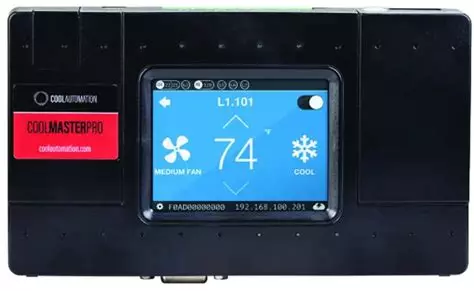
01 · CoolMasterPro — the translator
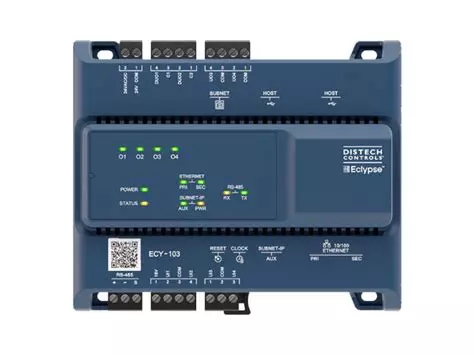
02 · Eclypse ECY-103 — the brain
And on the points side, it’s open bar:
- setpoints, read/write;
- room temperature of each indoor unit (more on that below, there’s a trap);
- modes: heat, cool, auto, fan;
- fan speed;
- and the Holy Grail: the exact Daikin fault codes. No more walking around the building to find which cassette is on its last legs, you know right away which one and why.
All the logic (schedules, automations, safeties) runs locally on the Distech. In practice, if the link to the outside drops, the building doesn’t even notice. It carries on with its quiet life.
Supervision: 4G, VPN and Niagara 4
For global supervision, the architecture is simple and clean:
- a 4G modem on site that sets up a VPN tunnel to our supervision server (no open port on the Internet, we’re not savages);
- on the server, a good old Tridium Niagara 4 that centralizes everything;
- for the client interface, the graphics are built with Distech Designer: smooth, responsive, readable.
The goal is for the facility manager to run their comfort at their fingertips, without needing a master’s degree in thermodynamics.
The real strong point: CoolAutomation support
Working hardware, you can find. Working support, much less so. And that’s where CoolAutomation really blew me away.
No bot sending you to page 142 of a PDF. People who know their subject inside out, who help you from the sizing stage, who validate the architecture with you and who answer fast on commissioning day when you have a doubt about the bus wiring. In our trade, that’s worth gold.
The small downsides (and one big trap)
Because nothing is perfect (and you wouldn’t believe me otherwise), here’s the trap that cost us a good while. Spoiler: it’s not the CoolMaster’s fault.
The return-air sensor that lies… but only to your BMS
The installation is Daikin ceiling cassettes. Each cassette has its own temperature sensor, hidden in the return air, at the ceiling. And each room also has its wall remote, which also has a sensor, at human height, where people actually live.
If nobody touches anything at commissioning, the cassette takes its return sensor as reference. And the problem is that hot air rises: at the ceiling, it’s warmer than at desk level.
On the Daikin side, no drama: the machine knows it and applies an internal correction in its control. Comfort is good, occupants feel nothing.
Except your BMS picks up the raw value. Result, the Temp_Room reported by the CoolMaster is offset by +2 to +4 °C compared to what the wall remote shows. And that stings:
- your trends and reports are wrong: you’re supervising temperatures that don’t exist in the room;
- your alarms for temperature drift trigger for nothing (or don’t trigger when they should);
- the client sees 24 °C on your nice graphic, 21 °C on their remote… and it’s you they call, not Daikin.
To help you visualize it, here’s a typical day. Hover over the curve, and switch the reference to see what the setting changes:
$ gtb trend --point Temp_Room
Mean gap (8am–7pm)
+2.5 °C
Max gap · 07:15
+4.0 °C
view data (1 point / hour)
| time | BMS | actual | gap |
|---|---|---|---|
| 00:00 | 19.6 | 18.3 | +1.3 |
| 01:00 | 19.4 | 18.3 | +1.2 |
| 02:00 | 19.2 | 18.1 | +1.1 |
| 03:00 | 19.4 | 18.0 | +1.3 |
| 04:00 | 19.1 | 18.0 | +1.1 |
| 05:00 | 19.2 | 18.0 | +1.2 |
| 06:00 | 20.1 | 18.5 | +1.6 |
| 07:00 | 23.7 | 20.0 | +3.7 |
| 08:00 | 24.3 | 21.1 | +3.2 |
| 09:00 | 23.7 | 21.1 | +2.5 |
| 10:00 | 23.1 | 20.8 | +2.4 |
| 11:00 | 23.6 | 21.0 | +2.6 |
| 12:00 | 23.7 | 21.3 | +2.5 |
| 13:00 | 23.4 | 20.9 | +2.4 |
| 14:00 | 23.4 | 20.8 | +2.6 |
| 15:00 | 23.5 | 21.1 | +2.4 |
| 16:00 | 23.6 | 21.1 | +2.5 |
| 17:00 | 23.4 | 20.8 | +2.6 |
| 18:00 | 23.0 | 20.7 | +2.3 |
| 19:00 | 22.5 | 20.4 | +2.1 |
| 20:00 | 20.8 | 19.4 | +1.5 |
| 21:00 | 19.9 | 18.8 | +1.1 |
| 22:00 | 20.0 | 18.6 | +1.4 |
| 23:00 | 19.8 | 18.6 | +1.1 |
| 00:00 | 19.8 | 18.6 | +1.1 |
Typical day simulated from gaps measured on site.
The fix (and a little message to commissioning technicians)
The fix is to switch the temperature reference to the wall remote’s sensor, via the unit’s on-site settings (Daikin field settings). Once done, the reported Temp_Room finally matches the room’s reality, and your supervision shows real values.
So, a friendly message to colleagues doing Daikin commissioning: remember to switch the temperature reference to the remote. The client paid for that sensor. It’s at human height, in the room, where the felt temperature really is. It would be a shame to leave it decorating the wall 😅
So, verdict?
If you have fleets of VRV to integrate cleanly over BACnet or Modbus, Daikin or otherwise, the CoolMaster clearly deserves a look. Truly plug & play, complete points, and a team behind it that doesn’t let go.
And you, what are your tricks for taming proprietary AC systems? Come discuss it on the message board!
See you soon for more tinkering 🔧
$ gtb react
Did this article resonate?
$ gtb comments --tail
Comments
// loading…