Open ChirpStack: I was sick of adding devices one by one, so I built the tool
6 October 2026 · 3 min
#lorawan,#chirpstack,#outil,#claude,#retex
Hello BMS folks! 👋
Right. Let’s talk about something that has been driving me up the wall for months: adding devices in ChirpStack.
Because ChirpStack is great, mind you. It’s free, it’s solid, it runs on a Raspberry as well as on a big server. But its web interface was designed to add one sensor. A single one. You click “Add device”, type the name, paste the DevEUI, pick the profile, validate, go to the keys tab, paste the AppKey, validate. And start over.
For 5 sensors, fine. For 300 temperature probes in a commercial building, you end the day with tendinitis and three swapped DevEUIs you’ll never find again. 🫠
Phase 1: “I’ll just write a little script”
Like any decent, slightly lazy integrator (it’s a quality), I turned to the API. A little Python script that reads the supplier’s Excel file and creates the devices, done in an hour.
Except.
After two LNS, I had:
- an import script, then a second one because the supplier had changed the column order;
- a script to migrate devices from one application to another (spoiler: ChirpStack has no button for that, you have to delete and recreate, praying you lose nothing along the way);
- a script to retag a whole floor;
- a script to find sensors that had been silent for three days;
- and a folder called
scripts_chirpstack_v2_final_OK_vraiment/that nobody dared to open anymore.
And don’t get me started on Excel, which kindly eats the leading zeros of your DevEUIs, or turns them into scientific notation, as soon as the column is in number format. Thanks, Excel. 🙃
Phase 2: “okay, Claude, you’re up”
At some point I’d had enough of gluing bits of code together here and there. So I plugged our friend Claude into it. I described everything that annoyed me, the twisted cases met for real on site, and what I would have wanted from the start.
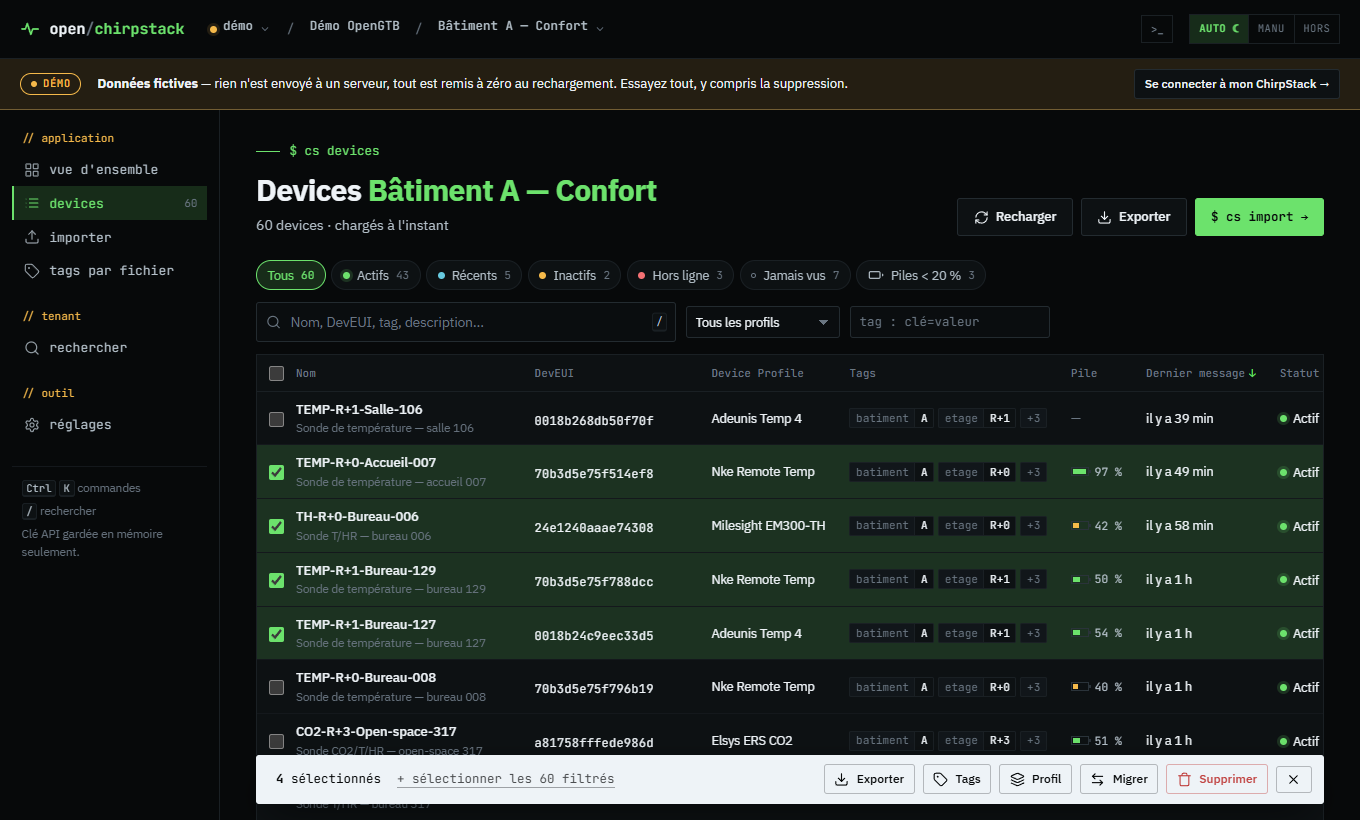
Result: it built the tool I’d have dreamed of. ChirpStack, but designed for volume and operations.
What it does
In no particular order, because the list is long:
- Bulk import from a CSV, an Excel file or a simple copy-paste from your spreadsheet. Columns are recognized automatically, everything is validated before sending, duplicates are updated instead of crashing, and you can undo the import.
- Migration from one application to another: record, tags, keys and session are copied, and if the recreation fails, the device is put back where it was. No more cold sweats.
- Bulk actions: you filter, you select (Shift + click for a range, like in the file explorer), then you tag, change the Device Profile, export or delete. With a JSON backup before deletion, just in case.
- Fleet health at a glance: silent sensors, never seen, low batteries, offline gateways.
- Measurement history: several sensors on the same graph, zoom, stats, CSV and PNG export. Handy for a post-mortem or to shut up a client who says “the room is cold”.
- And the life-saving detail: it detects DevEUIs mangled by Excel. ❤️
How it works
No Docker, no server, no account. You download a single file (Windows, macOS or Linux, and even ARM for your Raspberry), double-click it, your browser opens and you paste your ChirpStack API key. That’s it.
Your key stays on your machine, nothing goes anywhere else, no telemetry. The tool just runs a small local relay between your browser and your ChirpStack, over gRPC-web, the protocol used by the official interface. So if your ChirpStack interface opens, the tool works, even behind a reverse proxy.
One piece of advice though: bulk actions really do modify your ChirpStack. Do your first run on a test application, okay? 😅
Want to try it?
No ChirpStack at hand? No problem: there’s an online demo with a fictional fleet of 247 devices, running entirely in your browser. You can break everything, even delete, it all comes back on reload.
👉 The tool page, with the demo
👉 Code and downloads on GitHub
It’s free, open source (MIT) and compatible with ChirpStack v4. If you find a bug or miss a feature, open an issue on GitHub or leave a comment right below. And if it saves you an afternoon of clicking, say so too, it feels good. 😉
See you, BMS folks!
$ gtb react
Did this article resonate?
$ gtb comments --tail
Comments
// loading…