APEX #1 — A Controller Running Docker, Seriously?
12 October 2026 · 5 min
#distech-controls,#eclypse-apex,#docker,#mqtt,#iot,#serie-apex
ECLYPSE APEX series — episode 1/6
You know that moment when someone hands you a building automation controller and, instead of thinking “boiler room”, you think “hey, what if I stuffed a LoRaWAN server in there”? No? Well, that means you’re a reasonable person. Me, not so much.
The Distech Controls ECLYPSE APEX is a perfectly serious HVAC controller… that also runs Docker containers. Yes, real ones. On a DIN rail. In a panel. Next to a circuit breaker.


So let me warn you right away: with the APEX, anything is possible. Well, almost. Anything is possible as long as you respect its hardware limits, and that’s exactly what this first episode is about.
It all started with an MQTT frustration
Let’s be honest, I didn’t get into this out of pure love for Docker. It all started with one little detail that drove me up the wall: ECLYPSE controllers do ship with MQTT… but publish-only.
So the controller can send its values to a broker, great. But subscribing to a topic to fetch a Zigbee temperature or a command coming from elsewhere? Nope. It’s a bit like having a phone that can make calls but never pick up. Such a shame, when the whole building IoT world speaks MQTT.
So I told myself: if the controller won’t listen, I’ll stick someone next to it who listens on its behalf. And on the APEX, that someone can live right inside a container.
What exactly is the APEX?
It’s the top of the ECLYPSE range. Distech pitches it as an “IoT Edge” controller that opens up a dedicated space for IoT and AI developers. Translation: a controller that officially lets you tinker with it.
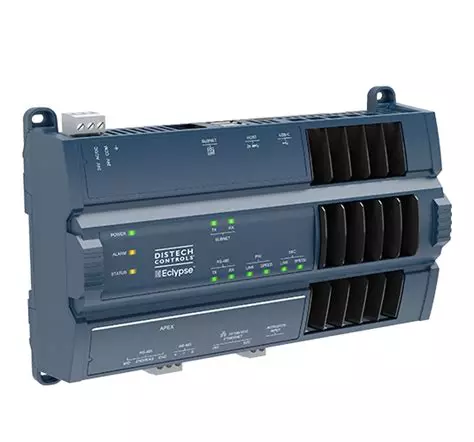
| Feature | ECLYPSE APEX |
|---|---|
| Processor | Quad-core Cortex-A53 1.6 GHz (ARM64), advertised as 10× more powerful than previous ECLYPSE models |
| Memory | 2 GB RAM, about 20 GB usable storage |
| Network | 2 × 1 Gbit/s Ethernet ports |
| I/O | Up to 320 points, i.e. 20 ECY expansion modules |
| Protocols | BACnet IP and MS/TP, Modbus RTU and TCP, M-Bus |
| Modbus | Up to 96 devices (32 per bus) |
| Openness | Embedded REST API, Docker containers, Azure IoT Edge |
| AI | Embedded TPU accelerator (absent from the “Generation 1” version) |
| Security | Secure boot and physical anti-tamper protections |
The real difference from an ECY-S1000 or a 400/600 isn’t the point count. It’s the Containerization menu in Eclypse Facilities, where you import images and create your own containers. And that, believe it or not, changes everything.
Anything is possible (or almost)
As soon as a controller can run Docker, it no longer just regulates a three-way valve. It becomes a small gateway that speaks pretty much every language in the building. On my test APEX, here’s what’s running today:
- Mosquitto, the MQTT broker, which acts as the common bus for everything else;
- Zigbee2MQTT, connected to an Ethernet coordinator, to drive $15 modules;
- ChirpStack, the LoRaWAN network server, for thermostatic heads and radio sensors;
- Node-RED, which bridges to the EC-gfxProgram program via the REST API;
- Telegraf, InfluxDB and Grafana, for nice trend charts without touching the supervision.

The part that makes it click: Node-RED can automatically create BACnet AV/BV objects in the APEX from whatever comes up over Zigbee or LoRaWAN. The result: a SONOFF module becomes a BACnet point like any other, visible from Niagara or any supervision system. That’s the grand festival of episode 4.
And here I have to give credit where credit is due. Sylvain Montagny did a great job on the subject with LoRaBAC, an open source Node-RED application that bridges LoRaWAN and BACnet. It can even write to Distech controllers through their REST API. We worked on very similar topics at almost the same time, each in our own corner: proof that the need is very real! If the LoRaWAN side interests you, definitely go take a look at his work.
And that’s where the loop closes: since the ECLYPSE’s MQTT can only publish, Node-RED plays the ears. It subscribes to the topics, then writes the values into the controller’s BACnet objects through the REST API. In the other direction, it picks up commands from the program and sends them back out to the devices.
…as long as you respect its limits
Yes, it’s a sturdy controller. But it’s not a Proxmox server. Before stacking containers like Kapla blocks, here are the walls I ran into.
| Limit | What it implies |
|---|---|
| 2 GB RAM (≈ 1.8 GB available) | Zigbee2MQTT alone takes 150 to 250 MB. With InfluxDB, Grafana, Telegraf and Node-RED running in parallel, it goes fast. |
| ARM64 architecture | You need multi-arch images. Some latest images are x86 only: check before pulling. |
| Administrative policy (OPA) | Facilities rejects a container whose config steps out of line: ports, mounts, assigned CPU core. The “administrative policy” message will be your new best friend. |
| Host ports in the 50xxx range | Each service must be published on a port in that range, and you need to keep a table so you don’t step on each other. |
| Networking between containers | Most reliable: go through the APEX’s IP and the published port. |
| No USB passthrough | No USB Zigbee dongle: use an Ethernet coordinator and connect to it over TCP. |
| No SSH, no compose | Each container is described in a creation JSON, and logs are read through a volume. |
My first reflex was to put everything in a single all-in-one image. Bad idea: impossible to maintain and to debug. A multi-container architecture, one service per container, is the only one that holds up. We’ll go over it in detail in episode 2.
Ground rules before you tinker
I know, you already want to launch your first container. But take three minutes to be serious, because we’re talking about a controller that heats buildings.
- Never on a production APEX without thinking. Everything I show runs on a test APEX, on my desk. A container that saturates the RAM means the control loop pays the price.
- Pin your image versions. A
latesttag that quietly changes on a Monday morning is the best way to spend the day on the phone. - Protect your volumes. That’s where your data lives. Zigbee2MQTT’s volume, for example, holds the network key: deleting it means re-pairing every device.
- Nothing exposed without authentication. Troubleshooting tools like FileBrowser get shut down as soon as you’re done.
- What I do is on me alone. We stay within the functions Distech provides, but integrating third-party components is your responsibility. If in doubt on a customer site, check with your Distech contact.
The series roadmap
- A Controller Running Docker, Seriously? — you’re here.
- The foundations — Docker on the APEX, the Containerization menu, the OPA policy and Mosquitto.
- Zigbee2MQTT — getting $15 modules to talk to a professional BMS.
- Node-RED and the REST API, the grand festival — every Zigbee module becomes a BACnet point.
- ChirpStack — a LoRaWAN server in the panel, with the same recipe.
- Open Apexpress — all of that in a few clicks.
That’s it for the introductions. The APEX is not a toy: it’s a building automation controller that had the good idea of opening up to tinkerers. As long as you respect its RAM, its ports and its rules, it takes just about anything you throw at it.
In the next episode, we pop the hood and launch the first container. Get the coffee ready.
Sources
$ gtb react
Did this article resonate?
$ gtb comments --tail
Comments
// loading…